Kong vs LiteLLM vs AISIX: Choosing a Self-Hosted AI Gateway

Yilia Lin
November 9, 2026
Your model calls work in development. Now the support and operations teams need to share the endpoint. The rollout checklist grows quickly: issue separate application credentials, restrict model access, cap batch workloads, configure a backup model target, and add a second gateway instance so a restart does not interrupt every caller.
An AI gateway can take on these responsibilities incrementally. With AISIX AI Gateway, for example, you can configure models, caller permissions, usage limits, and primary/backup routing in an OSS resource file. The gateway handles request controls for the shared endpoint. When you need self-service administration, centralized reporting, or monetary budgets, you can evaluate Enterprise or Cloud.
LiteLLM and Kong AI Gateway address many of the same needs. When comparing AI gateways, consider what it takes to meet the same requirements: which components you deploy, which state must be shared, which capabilities need a commercial license, and who maintains the resulting system.

Figure 1. Expand the acceptance criteria as requirements grow. Centralized management is optional, rather than a destination every team must reach.
What do you need to run for the first application?
Start with an existing application that uses OpenAI Chat Completions. Have it request a stable model alias, while the gateway maintains the provider, targets, and credentials behind that alias. Keep real application requests in the evaluation. If the app relies on tool calling or streaming, validate those behaviors alongside ordinary text responses.
-
AISIX OSS starts with one gateway container and a
resources.yamlfile. The file declares provider credentials, models, and caller credentials. You can start without a dashboard, control plane, or separate configuration store. You still need upstream endpoints and credentials, but the gateway components you operate for the initial trial are limited. -
LiteLLM Proxy can also start small. It provides both an in-application SDK and a Proxy service for multiple applications; this article compares the Proxy. You can start a basic proxy through the CLI and use
config.yamlto declare the model list and routing settings. PostgreSQL is not a prerequisite for every LiteLLM request. It enters the deployment when you adopt built-in management capabilities such as Virtual Keys and spend tracking. -
Kong AI Gateway requires choosing a deployment path first. Here we follow the database-backed path in the official AI Gateway 2.3.0 on-premises installation: the gateway stores configuration in PostgreSQL, installation includes a database migration job, and an Enterprise license is required. decK applies configuration. Neither decK nor the migration job should be counted as an additional long-running gateway service.
Kong Gateway also supports declarative configuration in DB-less mode, and AI plugins document their supported topologies. This is a separate option to validate against the relevant Gateway version and plugin configuration; the database-backed installation steps do not apply unchanged.
Basic forwarding is the starting point. Add credentials, permissions, limits, and backup targets to the same acceptance criteria to see how the deployment changes.
How much can you manage with open source when two teams share models?
Give support and operations separate credentials for the same model alias. Support must not access an operations-only model, and the operations batch workload needs its own limit. If the primary target fails, the gateway should try a backup according to its configuration. These requirements turn a working proxy into a service that applications can share.
For teams that need model permissions, usage limits, and primary/backup routing, AISIX OSS can keep this configuration in the resource file without first deploying centralized management or a configuration database. Caller model permissions, request or token limits, and model targets are gateway resources. The platform team remains responsible for credential distribution, configuration deployment, and rollback.
For example, this caller configuration excerpt assumes that shared-model already exists and reads credentials from environment variables. Support and operations receive limits of 60 and 10 requests per minute respectively. A complete resource file also needs provider and model definitions.
api_keys:
  - display_name: support-app
    key_env: SUPPORT_CALLER_KEY
    allowed_models: [shared-model]
    rate_limit: {rpm: 60}
  - display_name: ops-app
    key_env: OPS_CALLER_KEY
    allowed_models: [shared-model]
    rate_limit: {rpm: 10}
A standard LiteLLM approach uses Virtual Keys: create keys for individual applications, restrict their models, and configure rate limits and budgets. This built-in key management path requires PostgreSQL to persist the relevant resources and usage records. You take on database operations and gain management APIs for issuing and maintaining keys.
Kong combines caller identity, model access rules, and plugins. In self-hosted deployments, multi-target routing and AI token or monetary rate limits involve plugins such as AI Proxy Advanced and AI Rate Limiting Advanced, which require AI licensing. Check the actual plugins and entitlements you need; access to the base gateway does not establish that those AI capabilities are free.
For a shared model endpoint, these are the differences to keep in view:
| Requirement | AISIX | LiteLLM Proxy | Kong AI Gateway |
|---|---|---|---|
| Separate credentials and model permissions | OSS: caller API keys and model permissions in the resource file | OSS: built-in Virtual Keys with PostgreSQL | Caller identity and model access rules; check the selected AI plugin licenses |
| Primary/backup model routing | OSS: targets and failover in the resource file | OSS: configurable fallbacks | AI Proxy Advanced requires AI licensing |
| Token-based usage limits | OSS: caller or model limits; Redis for shared counters | OSS: Virtual Key limits; Redis for multiple instances | AI Rate Limiting Advanced requires AI licensing; Redis is the shared-counter option shown here |
| Monetary budgets and blocking | Enterprise/Cloud; enable Hard stop at limit for blocking | OSS includes basic Virtual Key budgets | AI rate limiting with cost for blocking; Konnect budgets are alert-only |
Whether you configure LiteLLM fallbacks or another gateway's backup targets, validate the failure conditions. Make the primary target return an explicit error before the response starts, then inspect the client result and upstream attempts. Separately, test a disconnect after content has started reaching the client. These failures affect the application differently. AISIX streaming failover has a boundary before response delivery begins: configuring a backup does not mean it can resume an interrupted answer.
Which state must be shared when you add replicas?
A per-minute limit working on one instance does not prove that it remains one aggregate limit after scaling. With independent counters, an application reaching different instances may consume each instance's allowance separately. Scaling therefore brings traffic distribution, configuration rollout, and shared counters into the same discussion.
Use one scenario to compare dependencies: two applications have separate credentials, model permissions, and request or token limits; the gateway has primary/backup model targets and two instances sharing caller rate-limit counters. Integrate ingress, model upstreams, and observability with your existing environment. The diagram focuses on what three selected deployment paths add.
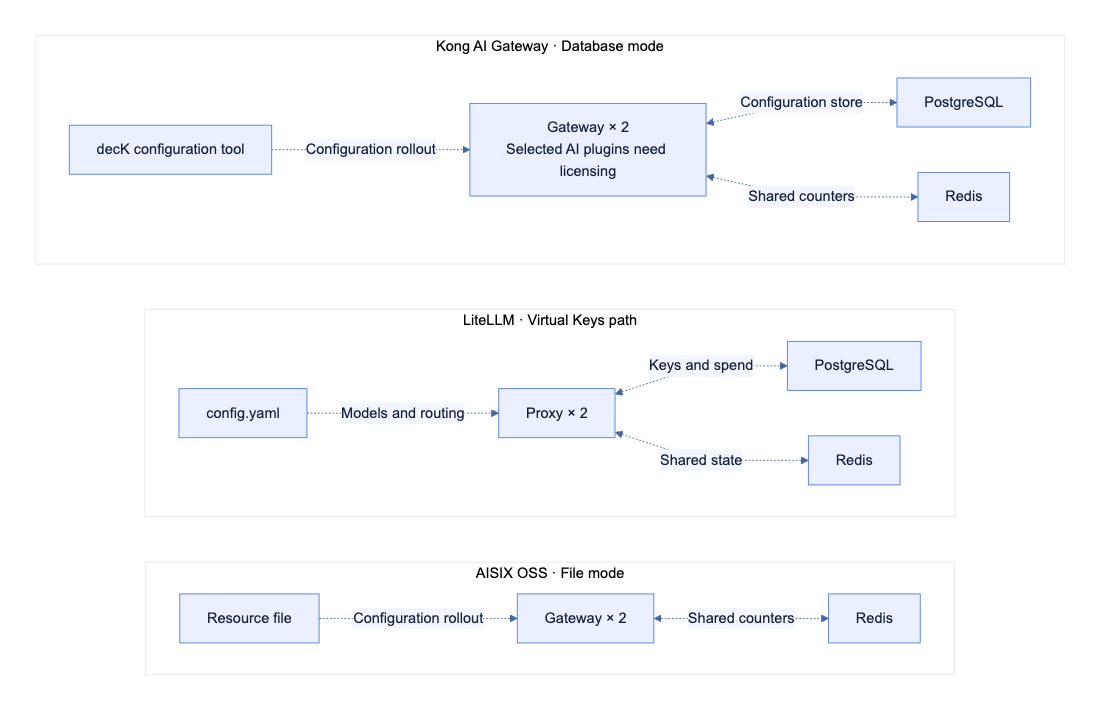
Figure 2. Configuration and state dependencies for three self-hosted paths under the same requirements. Each group is an alternative. Dotted lines represent configuration or state access, not inference traffic. Common ingress, model upstreams, and observability are omitted. decK is a configuration tool; the database migration job is not shown.
-
AISIX OSS can stay in file mode and use Redis for shared rate-limit counters. Its default counter storage is process memory: loading identical resource files on two instances does not automatically share allowances.
-
LiteLLM Proxy retains PostgreSQL for its built-in Virtual Keys path and uses Redis to share state such as rate-limit and routing information in multi-instance production deployments.
-
Kong AI Gateway: the path shown uses Redis for shared AI rate-limit counters and retains PostgreSQL for database-backed configuration. Kong also offers strategies such as
localandcluster, with topology-specific restrictions:clusteris unavailable in DB-less, hybrid, and Konnect deployments. Counter synchronization also affects accuracy.
The diagram represents three selected paths; each product also supports other component combinations.
Validate configuration rollout across instances too. Suppose you change the primary target for shared-model from A to B. A 200 at the shared endpoint does not confirm that both instances have updated. In a test environment, inspect the actual target used by each instance, then verify rollback. The official AISIX Helm path applies resource changes through a Pod rolling update. Whichever rollout path you choose for LiteLLM or Kong should pass the same scope-of-effect check. A successful configuration submission is insufficient.
Run the same failure checks for all three options. If shared counters become unreachable, does the deployment reject requests, use local counters, or take another configured fallback path? How does it resume sharing state after recovery? For example, AISIX can fall back to local counting when its Redis rate-limit backend is unavailable; a single cluster-wide allowance is no longer enforced during that period. Strict quota requirements need alerts and an operational response for this boundary.
Your operational scope now includes state services, configuration and Secret distribution, monitoring, upgrades, and rollback. Counting components is useful, but understanding their responsibilities and failure effects is equally relevant.
What changes when you need budgets, audit, and self-service administration?
As application numbers grow, teams may want a UI for issuing keys, viewing spend, setting monetary budgets, and tracing configuration changes. These requirements do not necessarily introduce a separate control plane. Some products serve management APIs and a UI from the existing service; others add management services or have the vendor operate them.
-
AISIX places centralized management in Enterprise or Cloud. With Enterprise, the customer operates the gateway,
cp-api,dp-manager, and PostgreSQL; production use needs a commercial license. With Cloud, API7 operates the control plane and the customer continues to run the gateway. API7 operates the control plane; gateway operations remain the customer's responsibility.AISIX OSS request, token, and concurrency limits do not replace the monetary budgets in Enterprise or Cloud. Those budgets combine model pricing and aggregated spend. With
Hard stop at limitenabled, once the gateway receives an exhausted-budget state, it blocks matching subsequent calls. Budgets can also be configured for warnings without blocking. The request that crosses the threshold, and requests admitted while that state propagates, can still incur charges.When adding management services to an OSS deployment, AISIX retains its gateway runtime and proxy API conventions. You still need to plan the migration of managed resources, credentials, and policies. A team that has validated application integration can preserve the interface it has tested while adding centralized reports and budgets, with explicit ownership of the new services.
-
LiteLLM Proxy in its open-source edition includes an Admin UI, Virtual Keys, basic budgets, and spend tracking. In a monolithic deployment, the same service can handle model traffic, management APIs, and the UI. Check Enterprise licensing for features such as audit logs and delegated administration. LiteLLM documents enabling Enterprise with a license on the same Gateway image, so that upgrade path does not require a separate control plane.
-
Kong AI Gateway: in its Konnect hybrid deployment, Kong operates the control plane and the customer operates the gateway. Dedicated Cloud puts both under Kong's operation, including gateway scaling, upgrades, and high availability. That changes the division of operational responsibility and should be evaluated separately from the self-hosted paths above.
Kong also distinguishes two monetary controls. Konnect AI Cost Management budgets track spend and send alerts; requests can continue after a threshold is reached. Blocking by monetary usage requires separately configuring AI rate limiting with the
coststrategy. A budget displayed in a spend dashboard does not establish request enforcement.
For cost comparisons, itemize gateway and storage resources, backup and upgrade work, commercial licensing, and model usage charges. Estimate which manual tasks self-service removes and who maintains the additional services. Open source or fewer components alone cannot establish a lower total cost.
Make the decision with one set of acceptance criteria
Use your immediate requirements to narrow the shortlist:
- AISIX OSS: start here if you want file-based model routing, caller permissions, and usage limits without first running a control plane or configuration database. Include Redis for shared counters, and validate your rollout and rollback process.
- LiteLLM Proxy: prioritize this path if you rely on its SDK or provider integrations, or want built-in Virtual Keys and basic monetary budgets in OSS. Include PostgreSQL, Redis for multiple instances, and their operational work in the evaluation, including when assessing other self-hosted alternatives.
- Kong AI Gateway: consider this path if you already operate Kong and can reuse that experience. Check the required AI plugin licenses and dependencies for your chosen topology.
Start with one existing application. Add a second caller and verify model permissions and independent limits. Add a backup target and second gateway instance, then test failures, shared counters, configuration changes, and rollback. At each step, record the additional components, licensing conditions, and operational ownership. Choose based on what your team actually needs to deliver.
Self-hosting the gateway alone does not determine where inference traffic goes: requests still reach the configured model upstreams, and logs and traces may have separate destinations. Include those destinations in the deployment inventory.
To evaluate an open-source LLM gateway with file-based configuration, follow the AISIX OSS quickstart. Get a real application request through first, then add your production requirements step by step.