Kubernetes Gateway API vs Ingress: Key Differences

October 21, 2022
Kubernetes now recommends Gateway API instead of Ingress. Ingress remains stable and supported, but its API is frozen. Gateway API is its role-oriented successor and continues to add portable routing capabilities.
That does not mean every existing Ingress must be replaced immediately. The choice depends on the routes you need, the support offered by your controller, and whether the migration cost is justified. This article compares the two APIs and shows how their resource models differ.
| Decision area | Ingress | Gateway API |
|---|---|---|
| API status | Stable, but frozen | Actively developed successor |
| Primary model | One Ingress object combines entry and routing rules | Gateway and Route resources separate infrastructure and application concerns |
| Portable routing | Basic HTTP and HTTPS routing | Header, method, query parameter, weighted traffic, and other standardized matches and filters |
| Extensibility | Controller-specific annotations and CRDs | Standard policies plus implementation-specific extensions |
| Migration | No change for existing workloads | Requires a one-time resource conversion and implementation testing |
Standardizing External Access to Services: The Ingress API
The Kubernetes Ingress API was created to standardize exposing services in Kubernetes to external traffic. The Ingress API overcame the limitations of the default service types, NodePort and LoadBalancer, by introducing features like routing and SSL termination.
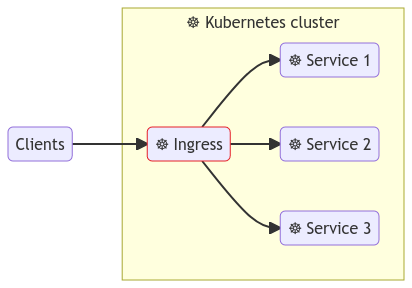
Many Ingress controller implementations are available. This article uses Apache APISIX and the APISIX Ingress Controller for examples.
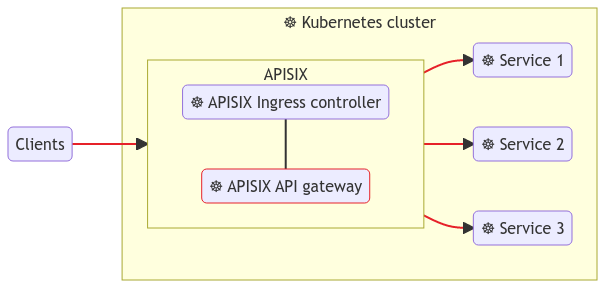
You can create an Ingress resource to configure APISIX or any other Ingress implementations.
The example below shows how you can route traffic between two versions of an application with APISIX Ingress:
apiVersion: networking.k8s.io/v1
kind: Ingress
metadata:
  name: api-routes
spec:
  ingressClassName: apisix
  rules:
    - host: local.navendu.me
      http:
        paths:
          - backend:
              service:
                name: bare-minimum-api-v1
                port:
                  number: 8080
            path: /v1
            pathType: Prefix
          - backend:
              service:
                name: bare-minimum-api-v2
                port:
                  number: 8081
            path: /v2
            pathType: Prefix
Tip: You can check out this hands-on tutorial to learn more about setting up Ingress on Kubernetes with Apache APISIX Ingress controller.
The core Ingress routing model is portable across conforming controllers, but this manifest explicitly selects APISIX with ingressClassName: apisix. To move it to another controller, change the class name, adapt any controller-specific configuration or behavior, and retest the route.
This works for simple routing. But the API is limited, and many additional controller features require implementation-specific annotations.
For example, the Kubernetes Ingress API does not provide a schema to configure rewrites. Rewrites are useful when your upstream/backend URL differs from the path configured in your Ingress rule.
APISIX supports this feature, and you have to use custom annotations to leverage it:
apiVersion: networking.k8s.io/v1
kind: Ingress
metadata:
  name: api-routes
  annotations:
    k8s.apisix.apache.org/rewrite-target-regex: "/app/(.*)"
    k8s.apisix.apache.org/rewrite-target-regex-template: "/$1"
spec:
  ingressClassName: apisix
  rules:
    - host: local.navendu.me
      http:
        paths:
          - backend:
              service:
                name: bare-minimum-api
                port:
                  number: 8080
            path: /app
            pathType: Prefix
This creates an Ingress resource that configures APISIX to route any requests with the /app prefix to the backend with the prefix removed. For example, a request to /app/version will be forwarded to /version.
Annotations are specific to your choice of an Ingress controller. These "proprietary" extensions limited the scope of portability intended initially with the Ingress API.
Custom CRDs > Ingress API
Relying heavily on annotations also makes complex configurations harder to validate and move between controllers.
Controllers also address Ingress limitations with custom resources. The example below routes traffic between two application versions with the APISIX ApisixRoute resource:
apiVersion: apisix.apache.org/v2
kind: ApisixRoute
metadata:
  name: api-routes
spec:
  http:
    - name: route-1
      match:
        hosts:
          - local.navendu.me
        paths:
          - /v1
      backends:
        - serviceName: bare-minimum-api-v1
          servicePort: 8080
    - name: route-2
      match:
        hosts:
          - local.navendu.me
        paths:
          - /v2
      backends:
        - serviceName: bare-minimum-api-v2
          servicePort: 8081
ApisixRoute is a custom resource owned by the APISIX Ingress Controller, not a Kubernetes Ingress resource. It makes APISIX-specific configuration easier to express and validate, but ties the manifest to that Ingress controller implementation. Without the Ingress API evolving, teams had to choose between richer controller-specific resources and portability.
Extending Ingress and Evolution to Gateway API
Ingress API was not broken; it was limited. The Gateway API was designed to overcome these limitations.
The project defines Gateway API as an expressive, extensible, and role-oriented model for Kubernetes service networking.
It takes inspiration from the custom CRDs of different Ingress controllers mentioned earlier.
Gateway API standardizes capabilities such as HTTP header matching and weighted traffic splitting that commonly require controller-specific annotations with Ingress. Implementations can support different subsets, so check their conformance and feature support before migrating.
Traffic split with the APISIX ApisixRoute custom resource (see ApisixRoute/v2 reference):
apiVersion: apisix.apache.org/v2
kind: ApisixRoute
metadata:
  name: traffic-split
spec:
  http:
    - name: rule-1
      match:
        hosts:
          - local.navendu.me
        paths:
          - /get*
      backends:
        - serviceName: bare-minimum-api-v1
          servicePort: 8080
          weight: 90
        - serviceName: bare-minimum-api-v2
          servicePort: 8081
          weight: 10
Traffic split with Gateway API (see Canary traffic rollout). This is a routing fragment: it assumes that a Gateway named example-gateway already exists and is accepted by your selected implementation.
apiVersion: gateway.networking.k8s.io/v1
kind: HTTPRoute
metadata:
  name: traffic-split
spec:
  parentRefs:
  - name: example-gateway
  hostnames:
  - local.navendu.me
  rules:
  - backendRefs:
    - name: bare-minimum-api-v1
      port: 8080
      weight: 90
    - name: bare-minimum-api-v2
      port: 8081
      weight: 10
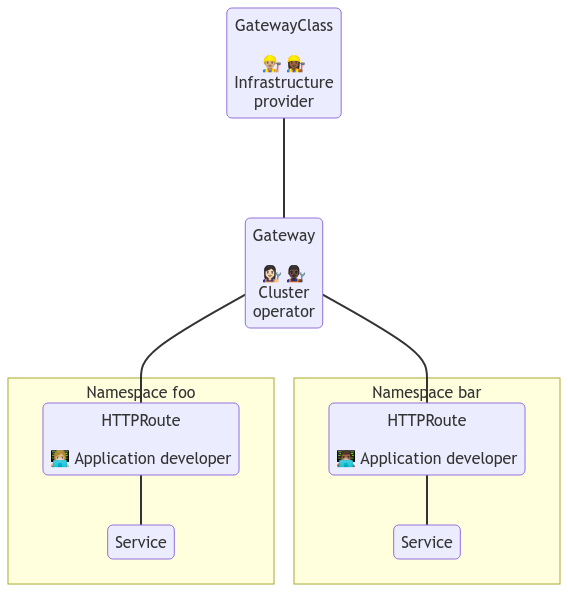
Another improvement from the Ingress API is how the Gateway API separates concerns. With Ingress, the application developer and the cluster operator work on the same Ingress object, unaware of the other's responsibilities and opening the door for misconfigurations.
The Gateway API separates the configurations into Route and Gateway objects providing autonomy for the application developer and the cluster operator. The diagram below explains this clearly:
Should You Migrate from Ingress to Gateway API?
Ingress is not being removed. Existing deployments can continue using it, and Kubernetes stability guarantees still apply. However, because the API is frozen, new portable routing capabilities are being developed in Gateway API.
Use Ingress when it already meets your requirements and the controller-specific annotations or CRDs you depend on are stable. Consider Gateway API when you need clearer separation between platform and application responsibilities, more expressive portable routing, or a long-term networking model that is still evolving.
Before migrating, verify that your selected implementation supports every resource, field, and policy you need. APISIX Ingress Controller documents its current Gateway API support, including partially supported and unsupported fields.
For a practical transition, use the official Ingress migration guide to map resources, then test controller-specific behavior before shifting production traffic. The Gateway API v1.6 and Ingress2Gateway migration guide covers conversion planning, while the Kubernetes migration guide covers staged traffic, validation, and rollback.
The right choice is therefore conditional: keep Ingress where it is sufficient, and adopt Gateway API when its model and your controller's verified support solve a concrete platform requirement.