PHP2Shell Emergency Mitigation: Blocking Risky Requests at the Gateway with Apache APISIX
October 24, 2026
While you arrange a PHP upgrade to address PHP2Shell, you can deploy security controls at the gateway first. Send requests through Apache APISIX: reject multipart requests on endpoints that do not need uploads, and use Coraza WAF to inspect request bodies on endpoints that do. Requests that match deny rules are blocked at the gateway and are not forwarded to PHP. These policies can be applied centrally across the gateway, to a group of APIs, or to a single API, buying time for backend fixes.
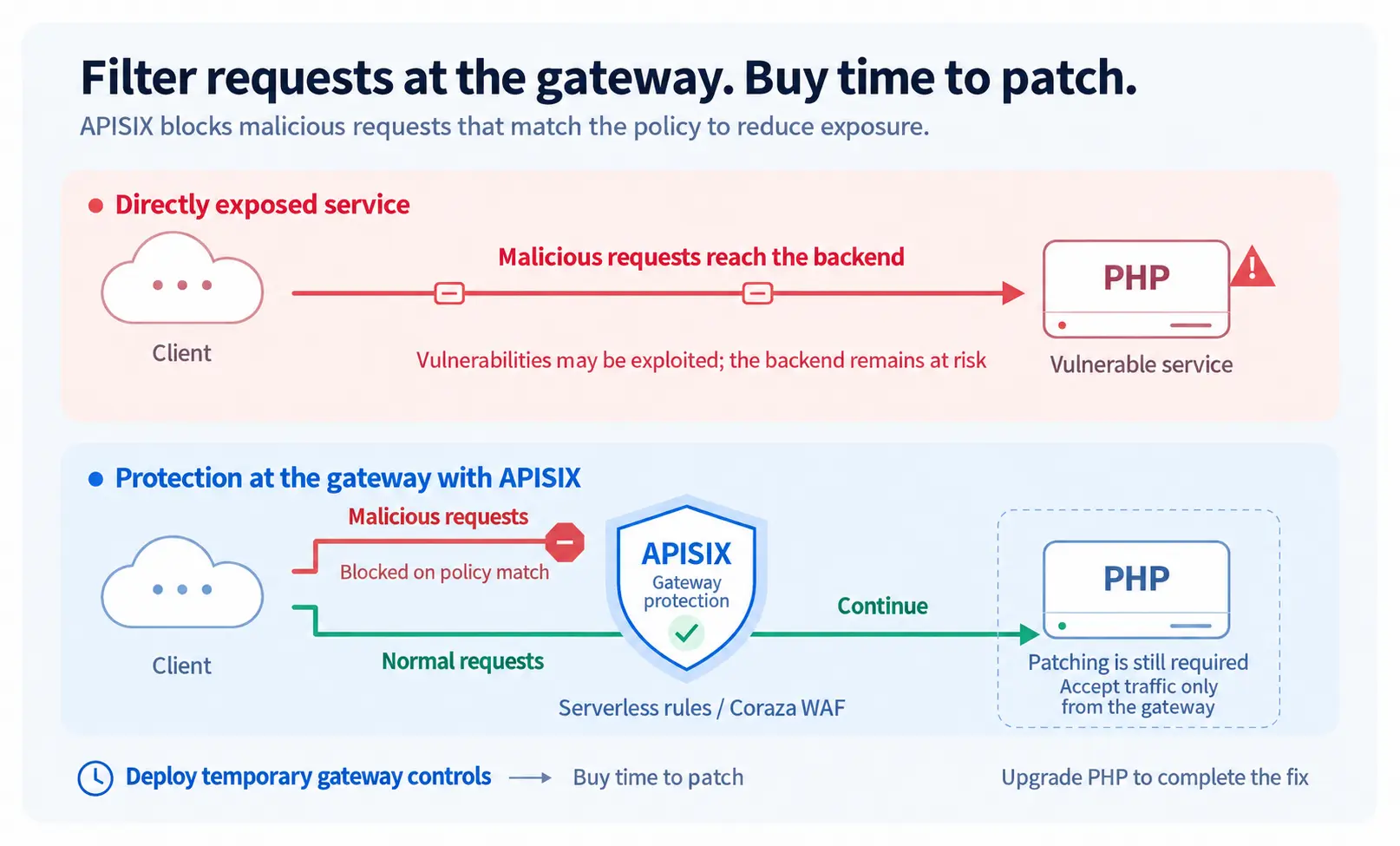
As shown above, APISIX inspects requests before they reach the PHP service. For this protection to work, the origin server should accept traffic only from the trusted gateway, preventing requests from bypassing inspection. Gateway rules provide temporary mitigation; they cannot fix defects in PHP itself. Apply the PHP security updates in parallel.
Information current as of October 24, 2026.
1. PHP2Shell: PHP security risks that need prompt attention
On October 21, 2026, PHP released security updates for CVE-2026-109618 and CVE-2026-109619. Both can lead to unauthenticated remote code execution and have a CVSS v4.0 score of 9.2. Web deployments including mod_php and PHP-FPM are affected. The PHP security advisory lists the following fixed versions; distribution users should also check their vendor's patch records.
The two vulnerabilities involve memory and state management during PHP request processing. Multipart parsing and upload-progress tracking are among the known entry points, so temporary controls can start by restricting these inputs.
| PHP branch | Fixed version for these two CVEs |
|---|---|
| 8.2 | 8.2.35 |
| 8.3 | 8.3.36 |
| 8.4 | 8.4.27 |
| 8.5 | 8.5.12 |
PHP published an additional upload-progress advisory on October 23. Security teams should also assess disabling that feature and other PHP-side measures described in the advisory, and confirm that the running PHP instances have been updated.
2. Choose between two temporary approaches
First determine whether the endpoint needs to accept multipart requests, commonly used for file uploads and form submissions. Choose approach A if it does not, or approach B if these requests must remain supported. The following examples illustrate typical checks and configurations; they do not provide complete protection against every exploit path. Security staff should extend and validate them for the application, strengthening or simplifying them as needed.
2.1 Approach A: reject unneeded multipart requests with Serverless
For JSON-only APIs or services confirmed not to use multipart forms, use serverless-pre-function to reject multipart before proxying and limit the request-body size. The following example also handles ambiguity in critical request headers and compressed request bodies. Legitimate multipart forms are rejected too; endpoints that need these requests should use approach B.
Serverless function example: inspect request headers, reject unsupported content encodings, and block multipart requests. The comments explain each check.
return function (conf, ctx)
    -- Read raw headers; reject an incomplete list so required fields are not missed.
    local headers, err = ngx.req.get_headers(100, true)
    if err then return 400 end

    -- Reject duplicate critical headers and underscore aliases to reduce parsing differences between the gateway and backend.
    local checked = {}
    for name, value in pairs(headers) do
        local lower = name:lower()
        local normalized = lower:gsub("_", "-")
        if normalized == "content-type" or normalized == "content-encoding" then
            if lower ~= normalized or type(value) ~= "string"
               or checked[normalized] then
                return 400
            end
            checked[normalized] = value
        end
    end

    -- This example rejects compressed bodies; design a separate decoding and inspection strategy if they are required.
    local encoding = checked["content-encoding"]
    if encoding and encoding:lower():match("^%s*(.-)%s*$") ~= "identity" then
        return 415
    end

    -- Reject multipart on endpoints that do not need uploads; continue processing other requests.
    local content_type = checked["content-type"]
    if content_type then
        local media_type = content_type:lower():match("^%s*([^;%s]+)")
        if not media_type then return 400 end
        if media_type:sub(1, 10) == "multipart/" then return 403 end
    end

    -- Add more security rules as needed ...
end
Place the adapted function above in functions, then configure the request-body size limit. The following YAML shows the plugin configuration to attach:
# Configuration structure only; replace the functions placeholder before use.
plugins:
  serverless-pre-function:
    phase: rewrite # Inspect requests before forwarding them upstream.
    functions:
      - "<Insert the Serverless function above after adapting it to your application>"
  client-control:
    # Limit for the entire request body, in bytes; 64 KiB is illustrative.
    # Adjust to normal request sizes; this is not a guaranteed safe threshold for PHP.
    max_body_size: 65536
Before using client-control, confirm that the deployment supports it: the plugin depends on APISIX-Runtime. Otherwise, have the operations team enforce an equivalent request-body size limit at the gateway or web server.
2.2 Approach B: keep uploads available and integrate Coraza to inspect request bodies
When uploads must remain available, integrate Coraza WAF with APISIX to parse and inspect request bodies. The following rules reject compressed request bodies, restrict upload-progress fields, and limit field-name nesting depth and the number of multipart file parts. Requests that match deny rules are not forwarded; other requests continue through the existing policies.
First follow the APISIX Integrate with Coraza guide to enable the WAF, then attach the plugin configuration below to the scope that needs protection. The example references APISIX 3.19.0 and coraza-proxy-wasm 0.6.0; the deployment team should confirm compatibility with its actual versions.
Rules and comments appear together to show what is checked and what happens on a match. The values 64 KiB, 12 levels, and 50 file parts are illustrative and should be adjusted to the application.
# Example rules illustrating common request checks, not a complete virtual patch.
plugins:
  serverless-pre-function:
    phase: access
    functions:
      - |
        return function(conf, ctx)
            -- Enable request-body processing before Coraza runs.
            ngx.var.wasm_process_req_body = "1"
        end
  client-control:
    max_body_size: 65536 # Illustrative limit for the entire body; adjust to normal application traffic.
  coraza-filter:
    conf:
      directives_map:
        default:
          # Keep the recommended rules that reject parsing failures and malformed multipart requests.
          - Include @recommended-conf
          # Enable blocking mode; logging rule matches alone does not stop requests from reaching PHP.
          - SecRuleEngine On
          # Allow the WAF to inspect request bodies.
          - SecRequestBodyAccess On
          # Limit for the entire body; coordinate with gateway request-body limits and reassess for uploads.
          - SecRequestBodyLimit 65536
          # Illustrative body-buffer size; adjust to the deployment.
          - SecRequestBodyInMemoryLimit 65536
          # Reject over-limit bodies rather than inspecting only part and allowing the request.
          - SecRequestBodyLimitAction Reject
          # This example inspects incoming requests, not response bodies.
          - SecResponseBodyAccess Off
          # Reject non-identity encoding; have security staff adapt this if compressed uploads are required.
          - >-
            SecRule REQUEST_HEADERS:Content-Encoding "!@rx (?i)^identity$"
            "id:110000,phase:1,t:none,deny,status:415,log,msg:'Encoded request rejected'"
          # Restrict the default upload-progress field, including file fields with that name; update this for custom names.
          - >-
            SecRule ARGS_NAMES|FILES_NAMES "@rx ^PHP_SESSION_UPLOAD_PROGRESS(?:\[|$)"
            "id:110010,phase:2,t:none,deny,status:403,log,msg:'Upload progress field rejected'"
          # Illustrative: reject field names with 12 consecutive nesting levels; this is not a guaranteed safe threshold for PHP.
          - >-
            SecRule ARGS_NAMES|FILES_NAMES "@rx (?:\[[^\]]*\]){12}"
            "id:110011,phase:2,t:none,deny,status:403,log,msg:'Deep field name rejected'"
          # Count multipart file parts with a filename parameter, including empty filenames.
          - >-
            SecRule MULTIPART_PART_HEADERS "@rx (?i)^content-disposition:.*;\s*filename\*?\s*="
            "id:110012,phase:2,t:none,pass,nolog,setvar:tx.php_file_parts=+1"
          # Illustrative: reject more than 50 file parts; adjust for batch uploads.
          - >-
            SecRule TX:php_file_parts "@gt 50"
            "id:110013,phase:2,t:none,deny,status:403,log,msg:'Too many file parts'"
      default_directives: default
Field names and thresholds should match the application: 64 KiB is usually unsuitable for file uploads. The nesting and file-count examples reference the CrowdSec temporary rule; they cannot prove that PHP will not run out of memory. Security staff should also assess differences between WAF and PHP parsing, and ensure that the backend receives the same input that was inspected.
3. Enable the policy globally, for a group of APIs, or for one API
Prepare the inspection capability, then choose its scope and publish the configuration. For approach A, place the adapted Lua function in the Serverless plugin. For approach B, complete the Coraza integration and load the adapted rules. Then add the corresponding plugins configuration to a Global Rule, Service, or Route. The diagram below shows the three configuration scopes:
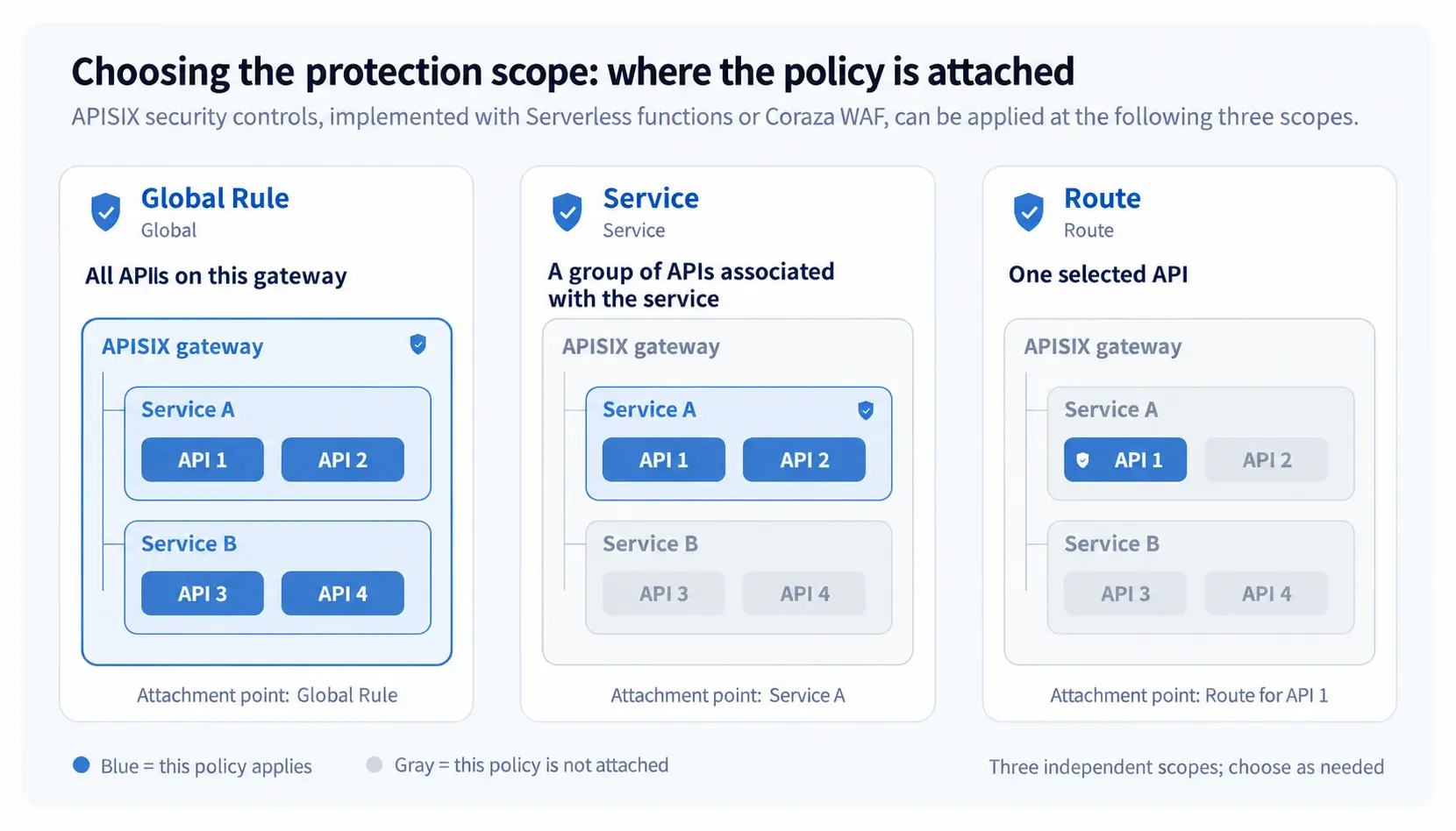
When upload requirements differ, prefer separate configurations by Service or Route. A Route's configuration for a plugin takes precedence over the Service's configuration for the same plugin. A global multipart rejection still blocks upload endpoints. Preserve and check existing authentication, rate-limiting, and other plugins when adding these controls.
After the configuration takes effect, requests within the selected scope are inspected first: APISIX returns an error for requests that match deny rules, without forwarding them to PHP. Other requests continue through the existing routing and policies. Rules can then be adjusted centrally at the gateway and applied more broadly over time.
4. Confirm three things before rollout
Normal application traffic succeeds: check compatibility using real request types, forms, and upload sizes so required functionality is not disabled.
Targeted requests are blocked at the gateway: verify rule matches in an isolated environment, and use gateway and upstream logs to confirm that rejected requests do not reach PHP.
The protection scope matches expectations: confirm that the policy covers the intended endpoints and that the origin server cannot be accessed directly. Monitor false positives and application success rates after rollout. Once PHP has been patched, reassess which temporary restrictions to retain or remove.
5. References
PHP security advisory, October 21, 2026: affected deployments, fixed versions, and PHP-side mitigations.
PHP upload-progress advisory, October 23, 2026: the subsequent CVE-2026-115560 warning.
RCE via OOM corruption (CVE-2026-109618): out-of-memory (OOM) handling, request-lifecycle defects, and mitigation limits.
RCE via stale global state (CVE-2026-109619): cross-request state and producer/consumer paths.
Integrate with Coraza (APISIX guide): Wasm module configuration and integration.