AISIX 1.9.0: Connect MCP Users with Their Own Upstream Authorization
November 6, 2026
An MCP client can give an AI assistant access to a team's tools, but a shared upstream credential can make every user appear to the upstream service as the same account. When the service needs to apply each person's own permissions, the connection must carry that person's authorization.
AISIX 1.9.0, released November 6, 2026, adds OAuth authorization-code authentication for upstream MCP servers of type: mcp. A user authorizes the upstream from their MCP client; AISIX then calls the upstream with that user's token. AISIX does not expose that upstream token to the MCP client, and it does not forward the client's gateway authorization to the upstream. The upstream service remains responsible for applying its own permissions.
One Server URL, Separate User Authorizations
Consider a team connecting an MCP client to an issue service. Alice and Bob can use the same per-server gateway URL, while each signs in and authorizes the upstream under their own identity. Their ability to read or change issues still depends on the upstream's authorization rules.
In a local demonstration using the official AISIX 1.9.0 gateway image, two separate MCP client sessions connected to the same URL. A simulated identity provider and simulated upstream service represented Alice and Bob. After each user completed sign-in and consent, the same whoami tool returned the corresponding simulated identity. This demonstrates the tested flow with those fixtures; it does not establish behavior for a particular third-party provider or prove its permission policy.
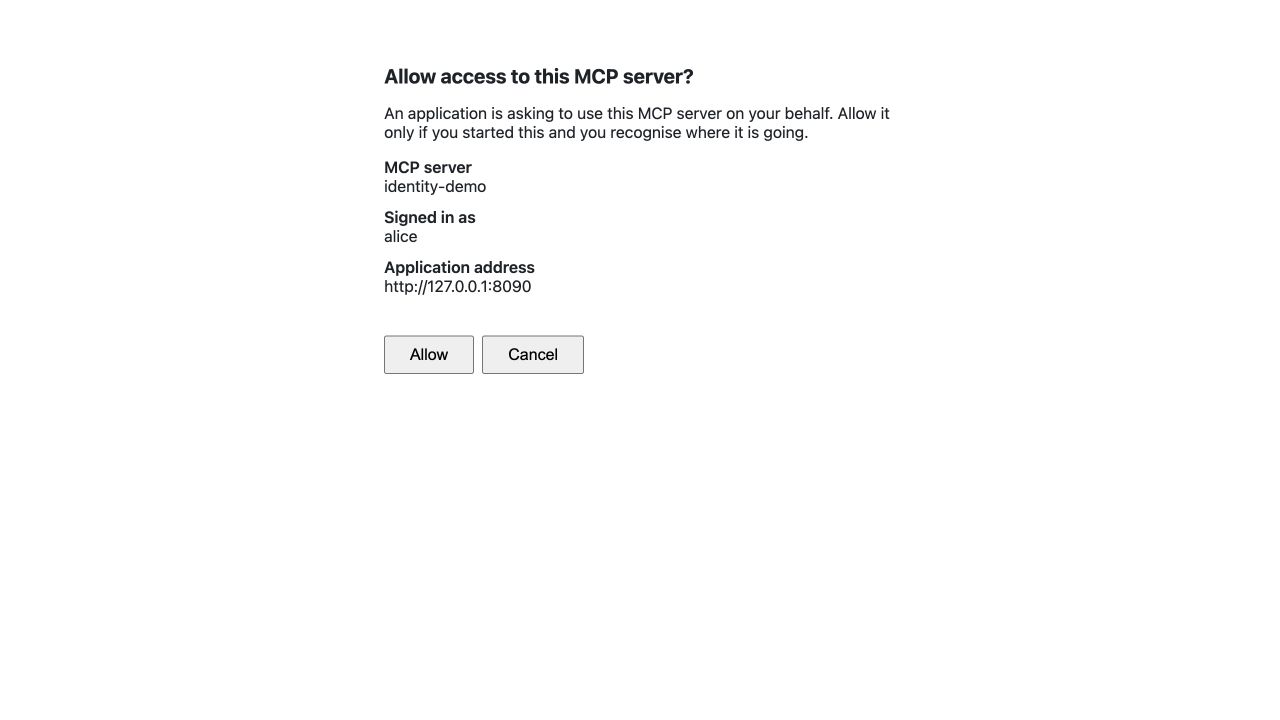
The actual AISIX 1.9.0 consent page identifies the MCP server and the simulated signed-in user before granting a local test client access. Open the image to inspect its original 1280×720 pixels. It does not show the upstream's permissions or prove a real provider's authorization policy.
In the recorded test, both clients used http://127.0.0.1:3000/mcp/identity-demo. The simulated upstream's whoami tool answered Local upstream received identity: alice for Alice's session and Local upstream received identity: bob for Bob's. These are observations from the local fixture, not production account data.
Alice — whoami: Local upstream received identity: alice
Bob   — whoami: Local upstream received identity: bob
These lines summarize the two recorded client responses from the simulated upstream. They show the selected local identities for these tool calls, not an upstream provider's production permission decision.
Configure the Sign-In Path
The gateway needs a public MCP resource URL and an MCP server configured for oauth2_authorization_code, together with the upstream's OAuth endpoints and client configuration. Follow the upstream authentication guide for the configuration and the upstream provider's requirements.
For URL-only interactive sign-in, configure exactly one enabled OIDC provider with login, plus the identity-to-gateway-access mapping described in the interactive sign-in guide. Otherwise, the client needs a gateway credential that identifies a user, such as a JWT or an owned API key; a credential without a user subject is insufficient for this per-user flow. Interactive sign-in uses the individual /mcp/{server} entry, not the aggregated /mcp entry. Route the required /.well-known/, /mcp/{server}/, and /mcp-oauth/ paths through any front proxy, and review outbound.ssrf_protection for OAuth endpoints on another authority.
Manage Credentials and Plan the Upgrade
In AISIX Enterprise and AISIX Cloud, upstream credentials are encrypted in the control plane through the data-plane manager, with refresh coordinated across gateways. Administrators with the mcp_server_credentials permission can list or disconnect credentials. A gateway may continue using a cached token for up to five minutes after a disconnect or purge; during a store outage, an already cached token can remain usable beyond that period until it expires. Disconnecting does not revoke the upstream grant or terminate existing stateless gateway sessions. Standalone AISIX OSS uses process-local memory, lost on restart, rather than managed shared persistence.
Canceling the AISIX consent page after upstream authorization does not undo that upstream authorization or delete a stored token. Disabling a user or removing a group at the identity provider does not immediately change claims already recorded in a live gateway session. By contrast, deleting or disabling the configured provider or changing its issuer can make the next per-server request require authorization again. Consult the sign-in guide when planning revocation and access changes.
The feature requires 1.9.0 gateways. In a managed environment, saving the new upstream OAuth configuration is refused with 422 DP_INCOMPATIBLE while an older gateway remains registered. Older gateways ignore the OIDC login field, and the save returns a warning. Upgrade and verify the gateways before enabling the workflow.
Review Other Upgrade Changes Separately
The OAuth flow is one part of this release. Before upgrading, review the full release notes for changes that affect your deployment:
- On the listed inference routes, clients that parsed JSON out of
error.messageshould read it as text and useerror.codeanderror.paramas separate fields where the upstream supplies them. Passthrough file, batch, fine-tuning and other routes retain their documented relay behavior. - For passthrough routes with
credential_mode: inject, name any client header that must still reach the upstream inforward_client_headers. The new stripping rule covers credential headers regardless of the ProviderKey'sstrip_headers; explicitly forwarding the injected header instead sends the caller's value.forward_clientmode is unchanged. - Review who can read failure records and exports.
error_messagecan contain text echoed by an upstream or parser even inmetadata_only; withcontent_mode: full, failed attempts can include request and response bodies, including an unmasked request that fails before guardrails finish. - A
provider_keybudget now accumulatesupstream_cost, falling back tocost_usdwhen it is null. If model-group pricing differs from target pricing, verify when the hard limit will be reached; previously accumulated spend remains. - On Vertex AI Gemini 2.5 or later, requesting thinking can expose reasoning in the response field. Output guardrails do not scan that thought text, and unsupported
maxorxhigheffort can now receive an upstream400for models that do not think by default. - On covered typed routes, a nonempty top-level
errorin an upstream 2xx response or stream frame is now treated asupstream_in_band_errorrather than a successful answer;null,{}, and""are not failures, and passthrough and realtime follow their stated rules. Recheck clients and alerts that relied on the earlier status. - Custom output guardrails now also run for responses with no text. A custom script must tolerate an empty
ctx.segmentsarray; a script that throws on a fail-closed row can refuse an otherwise empty or image-only response. - AISIX Enterprise operators should confirm
AISIX_CLOUD_MASTER_KEYis set to the same value asAISIX_DPMGR_MASTER_KEYbefore upgrading:cp-apinow exits at startup if its key is empty. Behind a proxy, configureauth.trusted_proxiesbefore interpreting audit and access-log client addresses; without it, those logs will show the proxy address. Check database connection headroom for each data-plane manager replica. - Revisit realtime alerts and clients: an upstream-refused
/v1/realtimesession now reports a failure status and metrics according to the refusal, although the client WebSocket upgrade can already have succeeded. Consumers of full-content OTLP, SLS and Datadog exports should also review changed prompt/media shapes and omitted base64 payloads before assuming previous field formats.
These changes have their own conditions and migration actions; they are not requirements of the MCP OAuth workflow.
Start with a non-production environment and verify the actual identity provider, upstream authorization, client, gateway routing, and disconnect behavior before rollout. The interactive sign-in guide provides a concrete configuration path.