API7 Gateway 3.10.9: Find Partial Service Discovery Failures
November 10, 2026
Key Takeaways
- API7 Gateway 3.10.9, released October 29, 2026, aggregates service registry health across online gateway instances instead of displaying the last instance's report.
partially_lost_connectionidentifies a registry reached by some reporting instances but not others. The Dashboard lists affected instances on hover; the registry API returns their instance IDs, hostnames, and loss times.- A Service Registry Lost Connection alert can notify when an instance remains disconnected beyond a configured duration. A newly created policy does not retroactively notify for a loss already older than its threshold plus check interval.
- Registry status identifies a discovery connectivity problem. It does not, by itself, prove that a particular API request failed or that an alert was delivered.
An intermittent upstream failure is hard to investigate when a gateway group presents one green or red registry light. One data plane may still discover service nodes while another has lost its registry connection. In earlier versions, whichever gateway instance reported last determined the visible registry status. That could obscure a partial outage.
API7 Gateway 3.10.9 changes the operational question from “Is the registry up?” to “Which online gateway instances have lost it?” The change applies to the service registries used for service discovery in a gateway group, including Nacos and Consul. It gives operators a more precise starting point for correlating discovery health with request failures; it does not replace request, upstream, or network diagnostics.
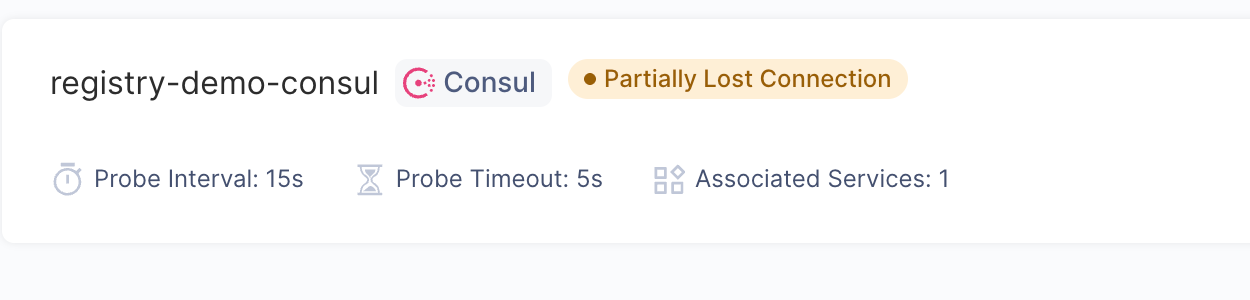
In a local 3.10.9 test environment, the Service Registries page marked the Consul registry Partially Lost Connection after one of two online data planes lost access. The badge identifies the aggregate registry state; it does not show which requests succeeded or whether a notification was delivered.
Locate the Affected Data Planes
The Control Plane aggregates reports from online instances; the 3.10.9 release notes exclude offline instances from this calculation. healthy means all online instances that reported on the registry are connected; lost_connection means all of them have lost it; partially_lost_connection means only some have lost it. connecting means no online instance has reported yet or the registry health check is disabled. Offline instances are not counted in these status decisions.
In the gateway group's Service Registries page, hover over a partial or lost status to see the affected instances and their Lost Since times. The /api/gateway_groups/{gateway_group_id}/service_registries endpoints expose the same state through status and lost_connection_instances, whose entries include instance_id, hostname, and lost_since. A status is based on reports, so compare the instance list with heartbeat and traffic data before attributing a specific HTTP 503 to discovery.
In our controlled test, both registry-demo-dp1 and registry-demo-dp2 continued reporting as Healthy and Compatible 3.10.9 gateway instances while the registry showed a partial loss. We disconnected only dp2 from the isolated Consul network, leaving its connection to the control plane intact. The registry API returned status: partially_lost_connection and identified registry-demo-dp2 in lost_connection_instances, with lost_since at 11:51:25 (UTC+8). The API result confirms the affected instance; the screenshot below confirms that neither instance was simply offline.
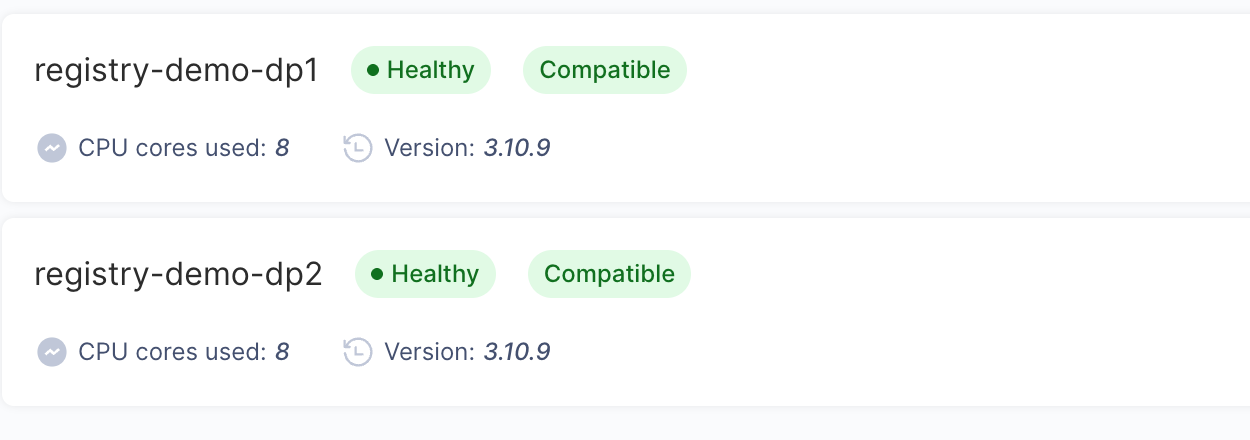
Gateway Instances in the same local test: both data planes display Healthy, Compatible, and version 3.10.9. These instance badges do not establish either data plane's connection to Consul.
Alert on a Sustained Loss
The new Service Registry Lost Connection (service_registry_lost_connection) event can fire while the aggregate status is partial. Configure a contact point and an alert policy scoped to the intended gateway groups or labels. Its rule tests whether any instance has lost a registry for longer than the chosen duration. The alert guide describes evaluation per instance and registry pair.
At each check, a pair matches only while its loss duration is greater than the threshold and no greater than the threshold plus the check interval. Each pair therefore notifies once per loss episode; recovery does not send a notification. A policy created after a loss has aged beyond that window does not send an alert for the existing episode. Verify the policy with a new controlled loss and inspect Alert History or the configured receiver; a partial status alone is not proof of notification delivery.
We configured a Service Registry Lost Connection policy for the default gateway group with a 30-second loss threshold, a one-minute check interval, and a local test webhook. Alert History recorded registry-demo-dp2 disconnected from registry-demo-consul for 52 seconds; Notification Logs recorded an HTTP 200 response from that local receiver, which also received the POST. This verifies delivery in the local test, not delivery to an external paging service.
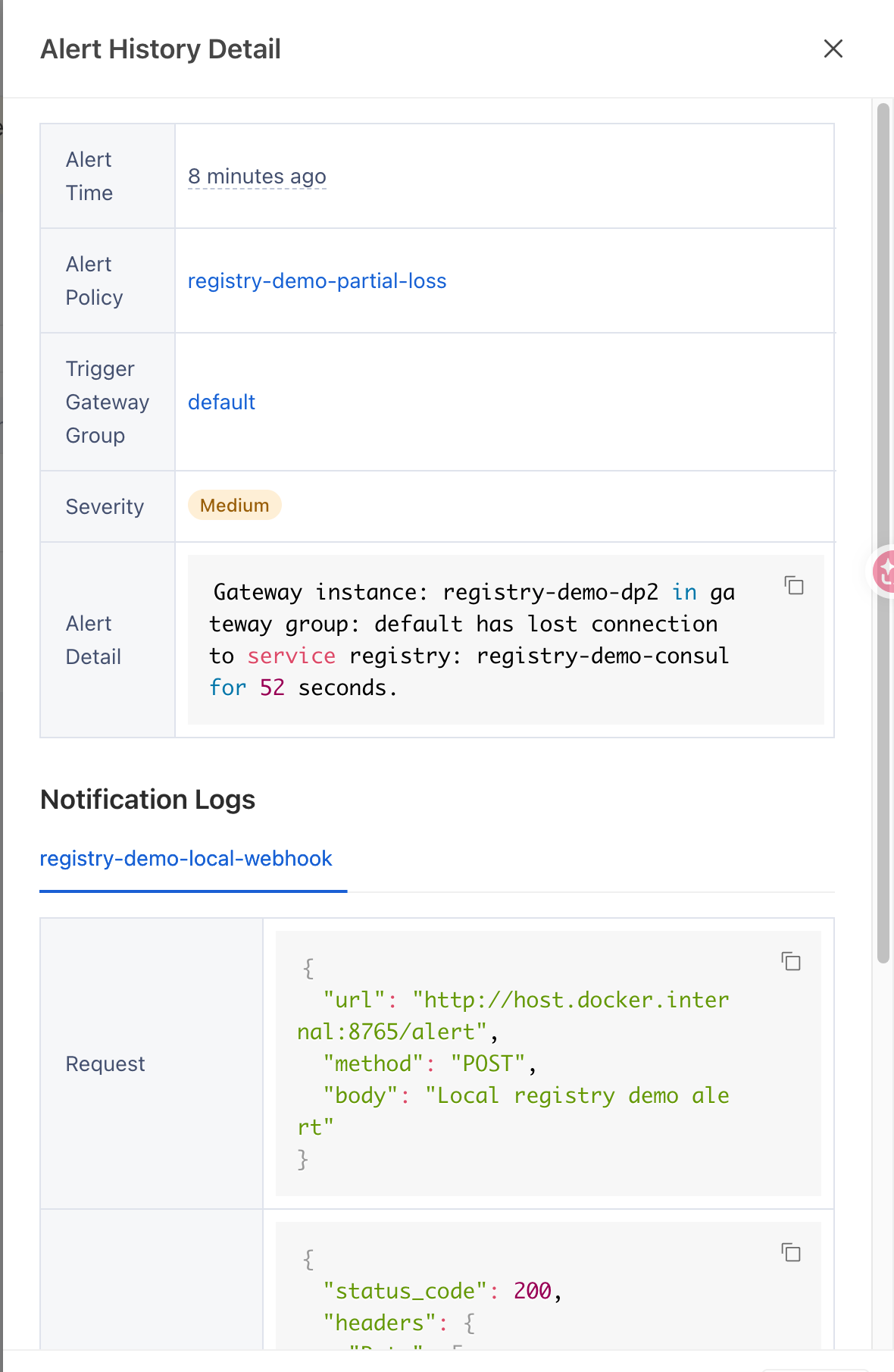
Alert History for the controlled 3.10.9 loss names the affected gateway instance, registry, and 52-second duration. The notification log belongs to the local demo webhook and does not establish production alert delivery or user impact.
Verify the Upgrade Against Your Registry Topology
The 3.10.9 release also changes the individual instance reports: an unreachable registry at instance startup or configuration change is now reported lost after the unhealthy health-check threshold, rather than remaining indefinitely connecting; a single failed probe no longer establishes loss. Check health-check settings and compare the new status with instance logs. The same release fixes a Consul watch race that could stop discovery updates and lead routes using that registry to answer HTTP 503. The status and alert changes improve diagnosis; they do not guarantee that every discovery or upstream failure is prevented.
For a controlled canary, use two 3.10.9 gateway instances in one group, a nonproduction registry, and a service that discovers through it. Confirm both instances report healthy, isolate only one instance from the registry until its health threshold is reached, then check the partial Dashboard status, lost_connection_instances, request behavior per instance, and the alert after its configured duration. Restore connectivity and confirm recovery; repeat with a new loss if testing a second notification. Do not infer that an offline instance is counted as a registry loss.
In this test, an intentionally registered Consul HTTP endpoint served as the demo upstream. Before isolation, requests through both data planes returned HTTP 200. During isolation, dp1 still returned 200, while a request through dp2 ended with a connection reset before an HTTP response. That result reflects this test's shared network path to the demo upstream; it is not a general status-code guarantee for a registry loss. After reconnecting dp2, both requests returned 200 and the Dashboard showed the registry as Healthy. Compare real application requests and upstream logs in your own topology rather than treating the registry badge as request-outcome evidence.
Plan the control-plane maintenance window: its first 3.10.9 start rewrites database tables that lack primary keys once, and the lock duration grows with table size. Then follow the rolling upgrade procedure. If adopting the separate 3.10.9 Consul https:// server-address feature during the same rollout, wait until every gateway instance in the group is upgraded; older instances skip a Consul registry with an https:// address. Review the complete release notes before changing registry connectivity or alert policies.