---
title: "How Does APISIX Ingress Support Custom Plugins - API7.ai"
description: "How to extend features for your K8s Ingress? What Ingress-NGINX can do is limited, while APISIX Ingress has various easy ways to fulfill your needs."
url: "https://api7.ai/blog/how-does-apisix-ingress-support-custom-plugins"
---
[Blog](https://api7.ai/blog)
[Products](https://api7.ai/category/products)[Technology](https://api7.ai/category/technology)[Ecosystem](https://api7.ai/category/ecosystem)[Case Study](https://api7.ai/category/usercase)[Team & Community](https://api7.ai/category/community)
Search
⌘ + K
[Blog](https://api7.ai/blog)
Products
# How Does APISIX Ingress Support Custom Plugins
API7.ai
October 11, 2022
[Products](https://api7.ai/category/products)
## Ingress & Ingress Controller
Ingress is one of the API objects of Kubernetes. It manages external access to the services in a cluster, typically HTTP/HTTPS.
Clients can follow the Ingress rules to route client requests to the Kubernetes cluster services or a specific `Pod`.
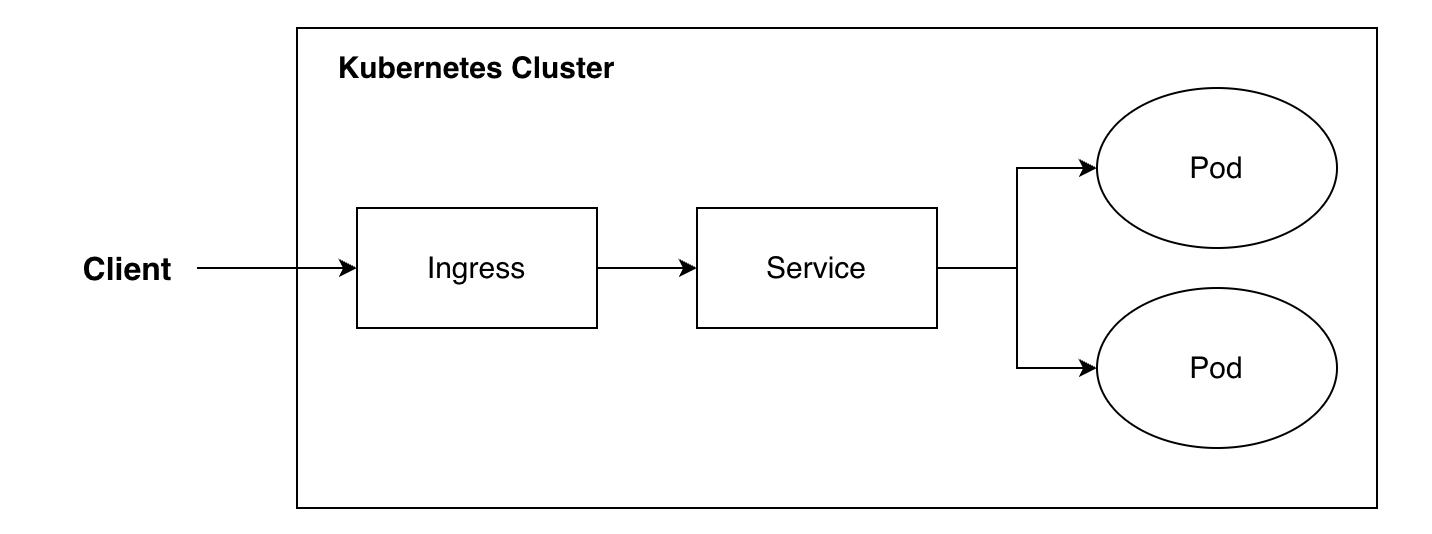
The following is an example of an Ingress resource:
```
apiVersion: networking.k8s.io/v1
kind: Ingress
metadata:
name: apisix-gateway
spec:
rules:
- host: apisix.apache.org
http:
paths:
- backend:
service:
name: apisix-gateway
port:
number: 80
path: /
pathType: Exact
```
The above example contains the following contents:
- `metadata.name`: name of Ingress resource
- `spec.rules[].host`: domain used by external access
- `spec.rules[].http.paths[].backend`: describes related information of services in a cluster
- `spec.rules[].http.paths[].path`: describes paths used by external access to services in a cluster
- `spec.rules[].http.paths[].pathType`: describes the path type to manage external access to services in the cluster
Based on the above example, we could notice that **the spec of the Ingress resource is relatively simple**.
Ingress is a resource definition in Kubernetes which couldn't handle any traffic by itself. So if we want to make Ingress resources effective, we must use a controller to process these Ingress resources, which is known as the Ingress controller.
The Ingress controller would keep watching any resource changes in the Kubernetes cluster and turn Ingress resource rules into the data layer's proxy rules so that the data layer could handle the traffic.
**In the actual production environment, there are many different kinds of client requests. For example, Ingress resources couldn't directly describe some of the most common features like authentication and URI rewriting. So how could we satisfy these requirements?**
## How does Ingress-NGINX support extensions?
First, we will use an example of the Ingress-NGINX controller in the Kubernetes ecosystem to demonstrate how to use the extensions.
We could use `Annotation` to describe the Ingress resources' needed extensions in Ingress-NGINX. For example:
```
apiVersion: networking.k8s.io/v1
kind: Ingress
metadata:
annotations:
kubernetes.io/ingress.class: nginx
nginx.ingress.kubernetes.io/enable-cors: "true"
nginx.ingress.kubernetes.io/cors-allow-origin: https://foo.com,https://bar.com
nginx.ingress.kubernetes.io/cors-allow-headers: x-foo-1,x-foo-2
nginx.ingress.kubernetes.io/cors-allow-methods: GET,POST,PUT
name: nginx-ingress
spec:
rules:
- host: kubernetes.github.io
http:
paths:
- path: /ingress
pathType: Exact
backend:
service:
name: nginx
port:
number: 80
```
The above configuration enables cors.
**It is relatively simple to add Annotations to the Ingress resource; however, we must notice that the Ingress-NGINX controller needs full support for these Annotations; otherwise, the configuration won't take effect. If we need to use some other undeveloped features of the Ingress-NGINX controller, we need to do some custom developments.**
The following sections describe how to use the Apache APISIX Ingress controller to meet these requirements.
## Use plugins in APISIX Ingress
[Apache APISIX Ingress](https://github.com/apache/apisix-ingress-controller) utilizes plugins to satisfy customers' various requirements for handling traffic and any specific scenarios. Currently, there are more than 80 ready-to-use plugins, and users can develop custom plugins to support new features.
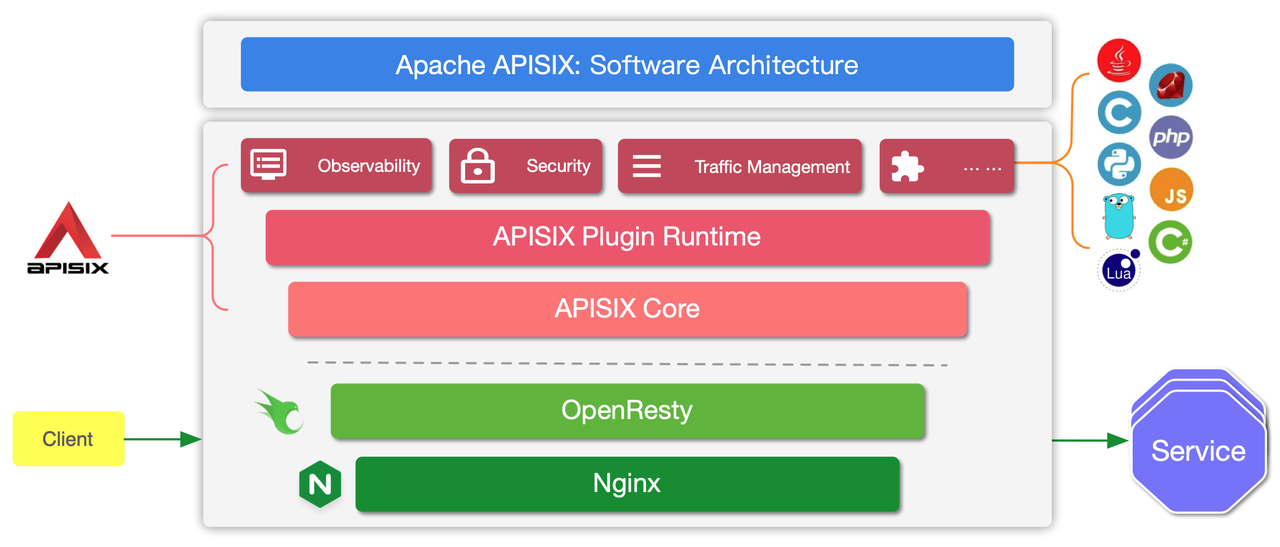
There are many different ways to develop custom plugins:
- Users could use Lua to develop plugins, and these plugins could run internally at the APISIX
- Users could also use other programming languages to develop plugins; this mechanism is called "plugin runner", and the plugins developed by this mechanism are called "External Plugin"
Please refer to the official docs about plugin development:
- Plugin Development:
- External Plugin Development:
We will introduce three ways to develop plugins using Lua in the APISIX Ingress.
### Pure CRD Mode
The APISIX Ingress controller supports its self-designed CRD specification, and you could directly enable [plugins](https://api7.ai/blog/how-to-build-an-apache-apisix-plugin-from-0-to-1) in the routing rules (whether an internal plugin or a custom plugin). For example:
```
apiVersion: apisix.apache.org/v2beta3
kind: ApisixRoute
metadata:
name: httpbin-route
spec:
http:
- name: rule1
match:
hosts:
- apisix.apache.org
paths:
- /apisix-ingress
backends:
- serviceName: apisix-gateway
servicePort: 80
plugins:
- name: cors
enable: true
config:
allow_origins: http://foo.bar.org
allow_methods: "GET,POST"
max_age: 3600
expose_headers: x-foo,x-baz
allow_headers: x-from-ingress
allow_credential: true
```
Users could use the above configuration to create routing rules, and cors plugin would be enabled in this route.
**This way is the most native support in APISIX Ingress, and it fits in well with APISIX. Also, when users add new custom plugins, APISIX Ingress doesn't need to be redeveloped so that users can use it directly.**
### CRD + Ingress Annotations Mode
We could also use CRD + Ingress Annotations to extend the features in APISIX Ingress, for example:
```
apiVersion: apisix.apache.org/v2
kind: ApisixPluginConfig
metadata:
name: cors-plugin
spec:
plugins:
- name: cors
enable: true
config:
allow_origins: http://foo.bar.org
allow_methods: "GET,POST"
max_age: 3600
expose_headers: x-foo,x-baz
allow_headers: x-from-ingress
allow_credential: true
---
apiVersion: networking.k8s.io/v1
kind: Ingress
metadata:
annotations:
kubernetes.io/ingress.class: apisix
k8s.apisix.apache.org/plugin-config-name: cors-plugin
name: apisix-ingress
spec:
rules:
- host: apisix.apache.org
http:
paths:
- path: /apisix-ingress
pathType: Exact
backend:
service:
name: apisix-gateway
port:
number: 80
```
Using the above configuration, we could independently create a plugin config called `cors-plugin` and use Ingress resource's `k8s.apisix.apache.org/plugin-config-name: cors-plugin` to refer to it. The actual effect is almost the same as the first configuration; they would both enable the cors plugin for the corresponding routes.
Under this mode, the plugin configuration could be considered as an independent resource, and multiple Ingress resources could also share them. Similarly, there is no need to make any custom developments.
### Ingress Annotations Mode
Due to the limited semantics of Ingress resources, we usually would use `annotations` to add some additional information for the resource objects, which is also the most common way to extend Ingress capabilities. For example:
```
apiVersion: networking.k8s.io/v1
kind: Ingress
metadata:
annotations:
kubernetes.io/ingress.class: apisix
k8s.apisix.apache.org/enable-cors: "true"
k8s.apisix.apache.org/cors-allow-origin: https://foo.com,https://bar.com
k8s.apisix.apache.org/cors-allow-headers: x-foo-1,x-foo-2
k8s.apisix.apache.org/cors-allow-methods: GET,POST,PUT
name: apisix-ingress
spec:
rules:
- host: apisix.apache.org
http:
paths:
- path: /apisix-ingress
pathType: Exact
backend:
service:
name: apisix-gateway
port:
number: 80
```
The above configuration will add some additional information related to cors into the Ingress resource. The APISIX Ingress controller could then identify this information and turn it into the configuration of the data layer to extend the features of the Ingress resource.
**However, under this mode, we must ensure that the APISIX Ingress controller has already been able to process these Annotations. Otherwise, we need to do some custom developments.**
If you need to carry out custom developments, please refer to the following doc:
- How to use APISIX Ingress controller to develop:
## Conclusion
This article mainly introduces the specs related to Ingress resources and how to extend features for Ingress resources. For example, in Ingress-NGINX, we usually could only use Annotations to extend features. However, in the [Apache APISIX Ingress](https://api7.ai/blog/apisix-ingress-integrates-with-service-discovery), we have three modes of configurations to satisfy advanced requirements and more scenarios. Besides, users don't need any custom developments for custom [plugins](https://api7.ai/blog/how-to-implement-plugin-orchestration-in-api-gateway) in most cases.
Tags:
[APISIX Ingress Controller](https://api7.ai/tags/apisix-ingress-controller)
[Comparison to Competitors](https://api7.ai/tags/comparison-to-competitors)
[Plugin](https://api7.ai/tags/plugin)
Share article link
Share
Related Posts
[](https://api7.ai/blog/how-to-use-cert-manager-and-vault-to-manage-certifications)
## [How to Use cert-manager and HashiCorp Vault to Manage Certificates?](https://api7.ai/blog/how-to-use-cert-manager-and-vault-to-manage-certifications)
[](https://api7.ai/blog/apisix-autoscale-applications-in-kubernetes)
## [Use APISIX, Prometheus, and KEDA to Scale Applications Elastically in Kubernetes](https://api7.ai/blog/apisix-autoscale-applications-in-kubernetes)
Table of Contents
- [Ingress & Ingress Controller](#ingress--ingress-controller)
- [How does Ingress-NGINX support extensions?](#how-does-ingress-nginx-support-extensions)
- [Use plugins in APISIX Ingress](#use-plugins-in-apisix-ingress)
- [Pure CRD Mode](#pure-crd-mode)
- [CRD + Ingress Annotations Mode](#crd--ingress-annotations-mode)
- [Ingress Annotations Mode](#ingress-annotations-mode)
- [Conclusion](#conclusion)
## Related Posts
[](https://api7.ai/blog/apisix-ingress-vs-ingress-nginx)
Products
December 6, 2022
#### [Why Is APISIX Ingress Controller Better than NGINX Ingress Controller?](https://api7.ai/blog/apisix-ingress-vs-ingress-nginx)
This article mainly compares the basic functionalities of APISIX Ingress and Ingress NGINX. APISIX Ingress is better than Ingress NGINX in terms of scalability, extensibility, and functionality.
[APISIX Ingress Controller](https://api7.ai/tags/apisix-ingress-controller)
[Kubernetes](https://api7.ai/tags/kubernetes)
[Traefik](https://api7.ai/tags/traefik)
[](https://api7.ai/blog/apisix-ingress-better-than-traefik)
Products
November 4, 2022
#### [Why Is APISIX Ingress Controller a Better Choice Compared with Traefik?](https://api7.ai/blog/apisix-ingress-better-than-traefik)
This article introduces the reasons for APISIX Ingress's advantages compared with Traefik.
[APISIX Ingress Controller](https://api7.ai/tags/apisix-ingress-controller)
[Kubernetes](https://api7.ai/tags/kubernetes)
[Traefik](https://api7.ai/tags/traefik)
[](https://api7.ai/blog/apisix-ingress-vs-emissary-ingress)
Products
March 17, 2023
#### [Why Is APISIX Ingress Controller a Better Choice than Emissary-ingress?](https://api7.ai/blog/apisix-ingress-vs-emissary-ingress)
This article compares the performance of APISIX Ingress Controller and Emissary-ingress from multiple dimensions such as scalability and service discovery integration.
[APISIX Ingress Controller](https://api7.ai/tags/apisix-ingress-controller)
[Kubernetes](https://api7.ai/tags/kubernetes)
[Emissary-Ingress](https://api7.ai/tags/emissary-ingress)